In short
- ROAS = revenue ÷ ad spend. A 4x ROAS means every 1.00 spent on ads returned 4.00 in revenue. That's 400% in Google Ads.
- ROAS is not profit. Google can't see your costs — only you can. Two stores with the same ROAS can have opposite outcomes.
- There is no universal "good" ROAS. Yours depends on your margin — which means tracking your full COGS+ first.
- Set it from your numbers: start at break-even ROAS, then walk it back 5% at a time towards your ideal (profit-built-in) ROAS.
- Change it rarely: no more than 10% at a time, no more often than every 14 days. Every change restarts learning.
- The free gROAS calculator works all of this out from your real numbers.
What is ROAS?
ROAS stands for return on ad spend. It answers one simple question: for every 1.00 you put into advertising, how much revenue comes back?
Say you sell coffee machines. Last month you spent 2,000 on Google Shopping and those ads generated 8,000 in sales. Your ROAS is 4x — every 1.00 of ad spend brought back 4.00 in revenue.
The same number gets written three ways, and they all mean exactly the same thing:
- As a multiple: 4x
- As a percentage: 400% — this is how Google Ads shows it ("conv. value / cost")
- As a ratio: 4:1
If someone says their ROAS is 350%, they mean 3.5x. Same maths, different accent.
The ROAS formula — how to calculate it
The formula
ROAS = Revenue from ads ÷ Ad spend
10,000 revenue ÷ 2,500 ad spend = 4.0x ROAS (400%)
Two more quick examples:
- A candle store spends 500, makes 1,100 from those ads → 2.2x (220%)
- A furniture brand spends 8,000, makes 30,000 → 3.75x (375%)
Try it with your own numbers:
That's the whole formula. The hard part isn't the division — it's making sure the two numbers you divide are the right ones. That's next.
Calculating an accurate ROAS
There are two levels. Most retailers stop at the first — the second is where the money is.
The basic calculation
Take the revenue your ad platform reports and divide it by what you spent. Useful for spotting trends, with three rules to keep it honest:
- Use attributed revenue — the sales your ads generated, not everything your store sold that day.
- Be consistent about VAT. Google reports your costs excluding VAT, but most UK stores send conversion values including it. Left unchecked, that flatters your ROAS by 20%.
- Match the time window. Compare a full 30 days, not a quiet Tuesday.
The advanced calculation (recommended)
An accurate ROAS is one measured against what the sale really costs you. We call that complete cost picture COGS+ — your product cost plus every other cost tied to the sale:
- Product cost (what you pay your supplier)
- Shipping you pay, and fulfilment
- Payment fees (typically 1.4–2.9% + a fixed fee)
- Import duties, packaging, marketplace fees
- Returns — the rate and the cost of processing each one
Missed costs are the biggest hit to retailer cashflow
Every cost you don't track still leaves your bank account — you just don't see it in your ads maths. Forget a 3.95 shipping cost and 2.9% payment fees on a 50.00 product and you're 5.40 out on every order — nearly 11% of revenue. At 500 orders a month, that's 2,700 in cash quietly missing from the plan. This is why knowing your full cost stack is your biggest leverage for profitable growth: every cost you find and price in makes every bid, every target and every campaign decision more accurate.
Tracking this by hand across a catalogue is the hard part — it's the exact job the free gROAS calculator does for one product, and GROW Cost Automation does for your whole catalogue automatically.
COGS+ — Advanced ROAS: the GROW method
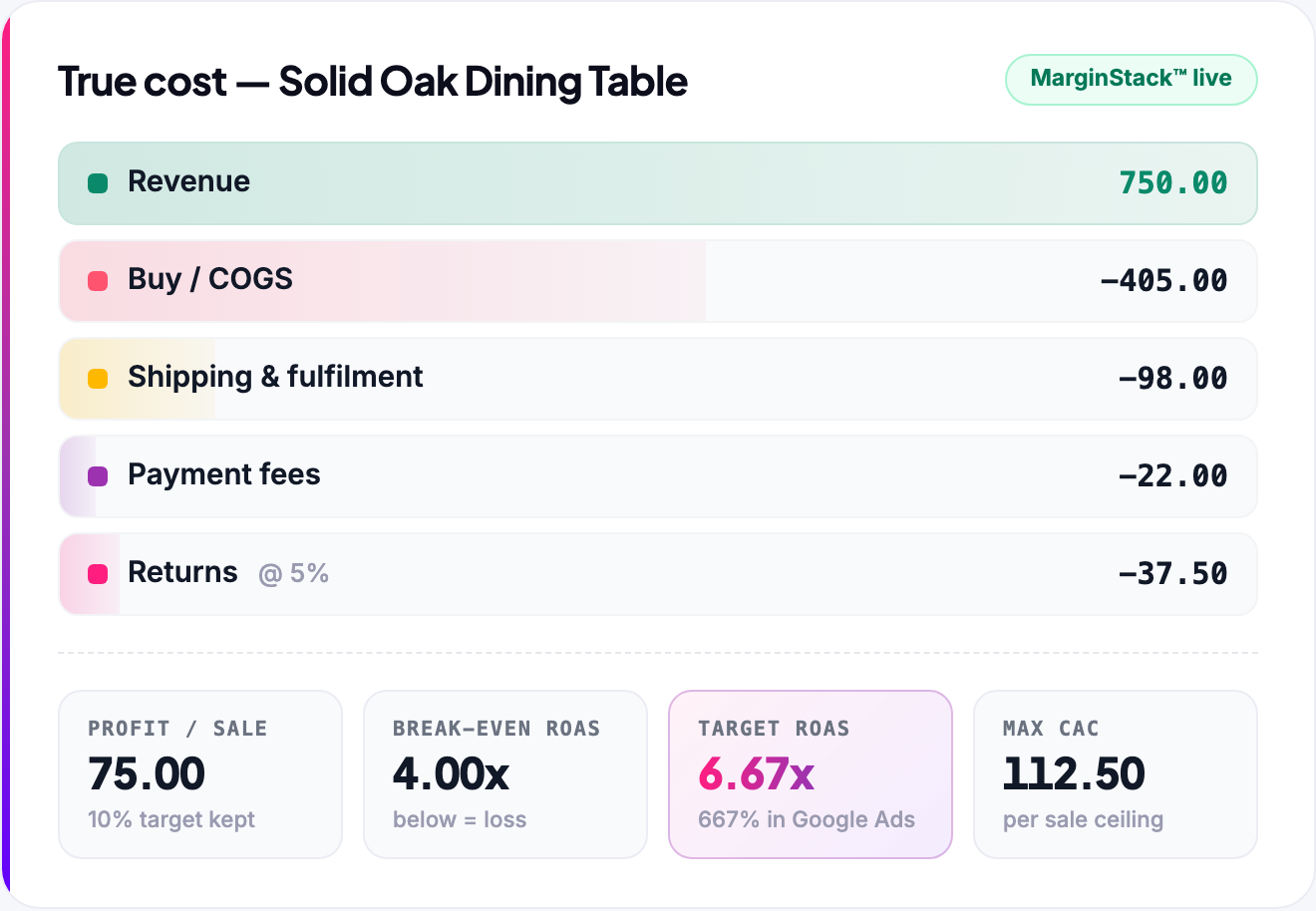
Standard ROAS maths stops at revenue. COGS+ is ROAS with the full picture: your product cost plus every other cost a sale carries — shipping, payment fees, fulfilment, duties and returns. Layer those in and your ROAS numbers stop describing revenue and start describing profit.
This is what that looks like for a single product inside GROW:
What to use COGS+ for in your ROAS bidding:
- Your break-even ROAS — calculated from your true margin, not the gross one, so the line between profit and loss is real.
- Your target ROAS — a number with your profit built in, per product, rather than a guess applied account-wide.
- Product-level bidding — thin-margin products need a higher ROAS bar; strong-margin products can bid harder and take more of the market.
- Repricing when costs change — a supplier increase or new shipping rate moves your break-even, so the bids built on it should move too.
ROAS is not profit
This is the biggest misconception in paid advertising — and the most expensive one. A strong ROAS can still lose money. Here's why:
- Google can't see your costs. Ad networks only know two numbers: what you spent and what revenue was tracked. Your supplier prices, shipping bills and fees are invisible to them — and to every ROAS figure they show you.
- Your purchase price is not your COGS. The supplier invoice is the start, not the total. Landed cost includes inbound shipping, duties and handling before the item even reaches your shelf.
- Fees aren't in there either. Payment processing, marketplace commissions, fulfilment — none of it appears in a platform ROAS.
- Returns are invisible. The platform records the sale the moment it happens. The 5–30% of orders that come back — with their return postage and repackaging — never get subtracted.
Same ROAS, opposite outcomes
Store A sells skincare at a 65% margin. At 4x ROAS, a 100.00 sale costs 25.00 in ads and 35.00 in product — 40.00 profit.
Store B sells electronics at a 22% margin. At the same 4x ROAS, a 100.00 sale costs 25.00 in ads and 78.00 in product and costs — 3.00 lost, before anyone's salary.
Same metric. Same number. Opposite businesses.
The takeaway: ROAS tells you how efficiently ads turn spend into revenue. Only your costs can tell you whether that revenue made you money.
What is a good ROAS?
The honest answer: there is no universal good ROAS. E-commerce averages sit around 2–4x, and Google Shopping typically runs 4–6x — but as Store A and Store B just showed, the same number can be brilliant or a problem depending on your margin.
The only benchmark that means anything is your own break-even ROAS — the point where a sale's profit exactly covers the ad that produced it:
Break-even ROAS
Break-even ROAS = 1 ÷ gross margin
35% margin → 1 ÷ 0.35 = 2.86x. Above this, ads add profit; below it, they cost you money.
| Your real margin (COGS+) | Break-even ROAS |
|---|---|
| 20% | 5.00x |
| 30% | 3.33x |
| 40% | 2.50x |
| 50% | 2.00x |
| 60% | 1.67x |
Notice the leverage: lifting margin from 30% to 40% cuts the ROAS you need by nearly a full point. This is why COGS+ comes first — the margin you feed into that formula has to be your real one, with every cost included, or your "good ROAS" is a guess.
How to set your ROAS
Once you've calculated your exact numbers with COGS+, setting a target stops being guesswork. The proven sequence:
- 1. Start at your break-even ROAS. It maximises traffic while protecting you from losses — the ideal launch setting. Enter it in Google as a percentage (2.86x = 286%).
- 2. Aim for at least 30 sales in the first 30 days. Google's bidding learns from conversions; below that volume it has too little to work with.
- 3. Walk the target back 5% at a time. Once sales are flowing, nudge the target up in small steps towards your ideal ROAS.
- 4. Hold each step. Give every change 15–30 sales (usually 14+ days) before the next move.
Your ideal ROAS — profit built in
Break-even keeps you safe; your ideal ROAS makes you money. It's the target with your profit goal baked into the maths:
Ideal ROAS
Ideal ROAS = 1 ÷ (gross margin − profit you want to keep)
35% margin, keeping 10% of each sale as profit → 1 ÷ 0.25 = 4.0x (enter as 400%).
The gap between break-even (2.86x) and ideal (4.0x) is your working range: sit near ideal to bank profit, flex towards break-even when growth or market share matters more that month.
My Google ROAS isn't working
Sometimes you set a sensible target and the traffic just doesn't come. Work through it in this order:
1. Fix your product feed first
On Shopping, your feed is your ad. If Google can't match your products to searches, no ROAS target will save the campaign. Enrich in this order:
- Product titles first. Think in the keywords your customer would search — brand, product, key attributes ("Bosch Cordless Drill 18V, 2 Batteries") — but write naturally. Descriptive beats stuffed, every time.
- Category and product type. Make sure the Google product category and your product type are set, and set correctly — they drive matching more than most retailers realise.
- Descriptions. Check and enhance them — cover what it is, who it's for, and the details buyers compare.
- GTIN / MPN. Include them wherever possible. They unlock better matching and more auctions.
2. Kick-start the bidding
- Set your target at break-even — or even slightly below it, briefly, to get the auction flowing.
- Once sales come, walk the target back 5% at a time, every 15–30 sales, ideally inside a 14–30 day rhythm.
3. If the margin just isn't there
Sometimes the honest answer is that CPCs in your category are too high for the product's margin — the maximum you can pay for a sale (your CAC) is below what clicks cost. That product may not suit Shopping right now. Three ways to change the maths:
- Build lifetime value — repeat purchases and subscriptions justify a higher CAC.
- Bundle — a higher order value spreads the same click cost over more revenue.
- Lower your cost price — better production or supplier terms widen the margin, and every point of margin lowers the ROAS you need.
How often should I change my ROAS target?
Less often than you think. The rules that keep campaigns stable:
- Never move more than 10% in one change. Small steps keep delivery predictable.
- Leave 10–14 days between changes — 14+ is ideal.
- Every change restarts learning. Google's bidding re-calibrates after each target move, and learning periods bring unpredictable results — the fewer you trigger, the better.
- Stability needs volume: roughly 30 sales inside a 14–30 day window is the level where performance settles.
Patience beats tinkering
The most common self-inflicted problem in Shopping accounts is changing targets too often, too sharply. Set the target from your maths, then let the data accumulate.
ROAS bidding in Google Ads — the key points
Everything above, condensed into the checklist that matters when you're in the account:
- Google's Target ROAS field takes a percentage: 4x = 400%.
- Set targets from your margins (break-even and ideal ROAS), never from someone else's benchmark.
- Start at break-even, walk back 5% at a time towards ideal.
- Change targets ≤10% at a time, ≥14 days apart — each change restarts learning.
- Feed quality first: titles, categories, descriptions, GTINs decide whether you enter auctions at all.
- A higher target deliberately buys less traffic — if spend collapses after a raise, the target is above what the market supports. Step it back down gradually.
- Value-based bidding needs ~30 conversions in a recent window to perform — consolidate thin campaigns before fine-tuning targets.
COGS+ explained
COGS+ is your complete cost per sale — product cost plus shipping, fees, fulfilment, duties and returns — tracked continuously, per product. It's the number every calculation in this guide depends on, and it's the heart of GROW Cost Automation.
How it works
- Connect your costs once — upload a CSV, sync a Google Sheet, or connect Shopify.
- GROW Cost Automation runs the calculations across 15+ cost layers for every SKU — the most advanced cost tracking system in retail.
- You get exact numbers per product: COGS+, real margin, break-even ROAS, ideal ROAS and the precision bid (max CAC) needed to hit your target.
- When a cost changes, everything updates — supplier price rise, new courier rates, changed fees — your targets recalculate instantly.
Why per-product matters
Break-even ROAS (1 ÷ margin) and ideal ROAS (break-even with your profit goal built in) are per-product numbers — because margin is a per-product number. A single account-level target treats your whole catalogue as one product with one margin.
Take a typical store selling three groups of products at very different margins:
| Product group | Real margin (COGS+) | Break-even ROAS | Ideal ROAS |
|---|---|---|---|
| Own-brand products (high margin) | 62% | 1.61x | ~2.1x — keeps ~14% of each sale as profit |
| Core range (mid margin) | 38% | 2.63x | ~3.6x — keeps ~10% |
| Reselling other brands (low margin) | 18% | 5.56x | ~8x — keeps ~5% |
Now set one blended target of 4x across all three — a number that looks perfectly reasonable — and every group gets the wrong instruction:
- Too high for the 62% products. They're profitable from 1.61x, but Google is told to only enter auctions it expects to clear 4x — so it bids cautiously, buys less traffic, and leaves profitable growth on the table.
- Too low for the 18% products. They need 5.56x just to break even, so a 4x target tells Google to keep buying sales that each lose money.
- Roughly right for the 38% core — but by coincidence, not calculation.
That's the inaccurate-ROAS trap: one account-wide number is simultaneously restricting volume on your best margins and eroding profit on your thinnest. Give each product its own break-even and ideal ROAS and the same budget produces more profit — no extra traffic required.
The superpower: cost automation + GROW's Google Shopping agents
Cost automation is one agent in the GROW agentic workspace. If you run Google Shopping, your COGS+ and bidding data power the campaigns automatically — every product bid from its own real margin, kept optimised daily by AI agents. Full end-to-end, profit-first Shopping ads: your biggest leverage for profitable, automated growth.
Create a free GROW account — your saved products from the free calculator come with you, and you can explore the full platform demo in minutes.
ROAS FAQs
Both — they're interchangeable. 4x = 400% = 4:1. Google Ads displays it as a percentage ("conv. value / cost"), so a 4x target is entered as 400%.
ROAS compares revenue to ad spend. ROI compares profit to total investment. A campaign can post a strong ROAS and a weak ROI if margins are thin — which is why COGS+ matters.
Profit on ad spend: gross profit ÷ ad spend. It's ROAS with the costs already subtracted from the numerator. A POAS above 1.0 means advertising is adding profit. If you track full COGS+, you can read POAS directly.
Marketing efficiency ratio: total store revenue ÷ total marketing spend across all channels. The zoomed-out cousin of ROAS — useful for judging the whole marketing budget, while ROAS judges an individual channel or campaign.
They're reciprocals. ROAS = 100 ÷ ACoS. A 25% ACoS is a 4x ROAS. Amazon speaks ACoS; Google speaks ROAS; the maths is the same.
Every 1.00 of ad spend generated 4.00 in tracked revenue. Whether that's good depends on your margin: comfortably profitable at 40%+ margins, below break-even at 25%.
Shopping campaigns typically run 4–6x, often a point above Search. But the benchmark that matters is your own break-even: 1 ÷ gross margin — a good Shopping ROAS is one comfortably above it.
Pick one basis and stay consistent. Google reports costs ex-VAT while most UK stores send inc-VAT conversion values — align them before comparing against your break-even. (Our calculator's VAT question handles this for you.)
No — platforms record the sale, not the return. If your return rate is meaningful, weight your margin for it so your break-even reflects the revenue you actually keep.
1 ÷ gross margin, with margin as a decimal. A 40% margin gives 2.5x. Use your full COGS+ margin — product cost, shipping, fees and returns — for a break-even you can trust.
Start at break-even (1 ÷ margin), then walk back 5% at a time towards your ideal: 1 ÷ (margin − desired profit). Set targets per product where margins differ — because they always do.
Not always — a very high ROAS often means underspending: capturing only the easiest demand and leaving profitable growth unbought. The aim is the most total profit, which usually sits at a moderate ROAS with healthy volume.
Because that's the deal you offered. A higher target tells Google to enter only the auctions it expects to clear that bar, so it buys fewer clicks. If spend has collapsed, the target is above what the market currently supports — step it back down gradually.
GROW Cost Automation tracks every cost tied to a sale — COGS, shipping, payment fees, fulfilment, duties and returns — continuously and per product, so your COGS+, break-even and target ROAS are always calculated from complete, current numbers, across your whole catalogue.
ROAS in summary
- ROAS = revenue ÷ ad spend. 4x, 400% and 4:1 all say the same thing.
- ROAS is not profit — Google can't see your costs, and your purchase price is not your COGS.
- An accurate ROAS is measured against COGS+: every cost tied to the sale, including fees and returns. Missed costs are the biggest silent drain on retail cashflow.
- There's no universal good ROAS. Your break-even (1 ÷ margin) is the only benchmark that matters — and your ideal ROAS builds your profit goal on top.
- Set it patiently: start at break-even, get ~30 sales in 30 days, walk back 5% at a time, and never change more than 10% or more often than every 14 days.
- If a target won't generate traffic, fix the feed first — titles, categories, descriptions, GTINs — then kick-start at break-even. If the margin's too thin for the auction, improve LTV, bundle, or buy better.
- Automate the whole thing — GROW Cost Automation tracks COGS+ per product and its Shopping agents bid every product from its own real margin.
The fastest way to make this real: run your own products through the free gROAS calculator, or create a free GROW account and let GROW Cost Automation do the whole catalogue.