gROAS by GROW
Free ROAS Calculator
Calculate the exact ROAS required to generate profit. Create a free account and add to Chrome to track 20x as many products.
Don't use Chrome? Create an account to use our free in-app calculator.
- Break-even ROAS, target ROAS and profit per sale
- COGS+ — every real cost that decides your bid
- Free in the browser, free in the app, free in Chrome
gROAS by GROW
Save your products
Enter your work email to save
We’ll create your free gROAS account and send one welcome email. Privacy
How it works
Three steps to the exact ROAS you need — free.
- 1Get the calculatorAdd to Chrome or use the in-app calculator. We recommend a free account to track up to 100 products.
- 2Scan your productVisit your product page and open the extension to scan it for prices, or copy the URL into our in-app calculator.
- 3Enter costs & calculateEnter your costs and press calculate to see COGS, COGS+, CAC, break-even ROAS, target ROAS and profit per sale.
- 4More sales, more revenueUse the exact target ROAS in Google Ads and stop guessing what a sale can afford to cost.
The ROAS formula
ROAS = revenue from ads ÷ ad spend.
ROAS (return on ad spend) = revenue from ads ÷ ad spend. Spend 2,500 and generate 10,000 in sales and your ROAS is 4x — every 1.00 of ad spend brought back 4.00 in revenue. Google Ads shows the same number as a percentage: 400%.
Try it here:
That number tells you what happened. The question that decides whether you make money is the reverse one — what ROAS do you need? — and to answer it you have to know exactly what each sale can afford to spend on ads.
The calculation that matters runs backwards
Target ROAS = the revenue Google tracks ÷ the ad spend one sale can afford. The second half of that division is built from your costs — which is exactly what the precision calculator above works out.
What the calculator works out
The same maths GROW uses to price live bids.
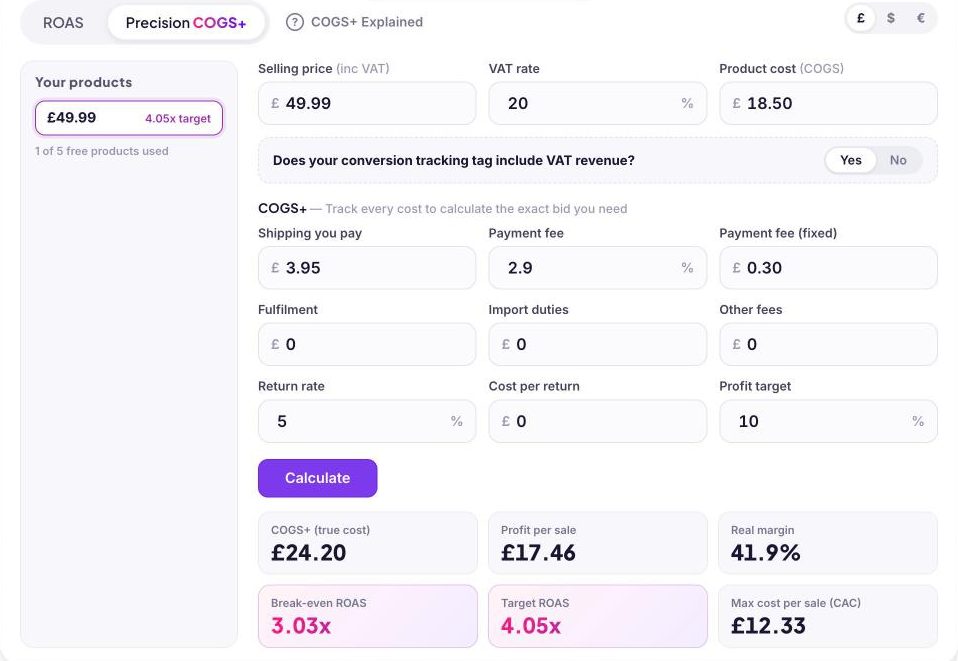
The Precision COGS+ tab runs the full calculation, the same way GROW prices live bids:
- Revenue basis. Your selling price, ex-VAT where VAT applies — VAT is a pass-through, so profit maths never include it. It also accounts for whether your conversion tag reports VAT-inclusive revenue, so the target matches what Google actually measures.
- COGS+ — your true cost per sale. Product cost plus shipping, payment fees, fulfilment, duties and expected returns. This is the number most sellers underestimate, and the reason a "profitable" ROAS often isn't.
- Allowable ad spend. What's left of each sale after COGS+ and the profit you want to keep — the most a sale can cost to win before it stops being worth winning.
From those three inputs it returns:
- Break-even ROAS — below this line, every sale loses money.
- Target ROAS — the number that protects your profit goal, with the exact percentage to enter in Google Ads (4.05x = 405%).
- Profit per sale and real margin — what you actually keep after every cost.
- Max cost per sale (CAC) — your ceiling for acquiring one customer.
Same engine as our live bidding
This page runs the exact bidding engine GROW uses to set live per-product bids on Google Shopping — results here match the platform's MarginStack™ calculations to the penny. For the full theory behind the numbers, read the complete guide to ROAS.
Calculator FAQs
Yes — free in the browser, free in the GROW app, and free as a Chrome extension. A free GROW account unlocks 100 saved products synced across all three.
A simple calculator divides revenue by ad spend. gROAS also calculates the ROAS you need: it layers your real costs (COGS+) to produce your break-even ROAS, target ROAS, profit per sale and maximum cost per sale.
Your true cost per sale: product cost plus everything else the sale carries — shipping, payment fees, fulfilment, duties and returns. It's the honest basis for break-even and target ROAS. Full explanation in the guide.
Yes. The summary shows the exact percentage to enter as your Google Ads target ROAS (a 4.05x target is entered as 405%), plus your maximum cost per sale to sense-check CPAs.
It scans any product page for the price, VAT and shipping, then calculates break-even and target ROAS in one click — 5 products free, or 100 synced with a free GROW account.
The calculator runs the same engine GROW uses to set live per-product bids on Google Shopping — results match the platform's MarginStack™ calculations exactly.
Grow Your Sales
Join the e-commerce brands letting agents do the heavy lifting on Google Shopping.